Table of contentsJump to a section24 sections
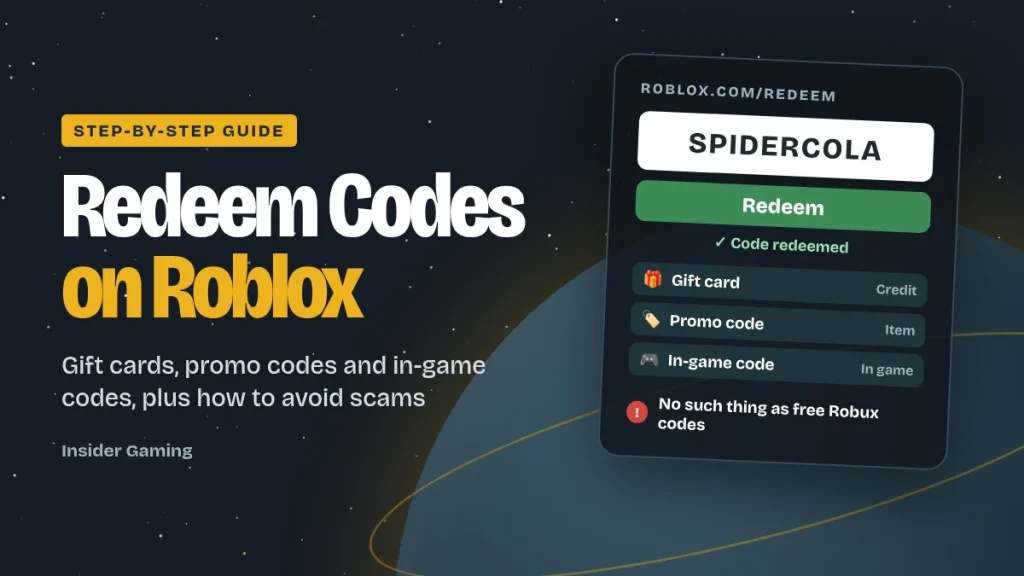
Quick answer: To redeem a code on Roblox, open roblox.com/redeem in a web browser, log in to the account you want the reward on, type your code into the box and click Redeem. This works for gift cards, promo codes and toy codes. You can’t redeem these in the Roblox app on iPhone, most Android phones, Xbox or PlayStation (only Samsung Galaxy users get an in-app option), so use a browser on any device. Codes for individual games, such as Blox Fruits, are different: you enter those inside the game itself.
Insider Gaming is independent and isn’t affiliated with Roblox. This guide contains no affiliate links. Checked against Roblox’s official help pages on 7 October 2026.
How to redeem a code on Roblox (step by step)
- Open a web browser on your phone, tablet or computer (Chrome, Safari, Edge or similar). Don’t use the Roblox app.
- Go to roblox.com/redeem. Type the address yourself rather than clicking a link from a video or message, so you can be sure you’re on the real Roblox site.
- Log in to the right account. Codes go to whichever account is logged in, so double-check the username, especially on a shared family device.
- Type your code into the box exactly as it’s written.
- Click Redeem. A success message appears when it works.
- Check your reward. Depending on the code, you’ll get Roblox Credit, Robux or a virtual item. Items appear in your Inventory under their category (for example, Hats or Back accessories).
You can redeem as many gift cards as you like, but you have to enter them one at a time.
Which type of code do you have?
“Roblox code” can mean five different things, and they don’t all work the same way. Find yours below.
| Code type | Where it comes from | What you get | Where to redeem |
|---|---|---|---|
| Roblox gift card | Physical or digital cards from shops | Roblox Credit, which you then spend on Robux or Premium | roblox.com/redeem (browser) |
| Amazon or Party Packs gift card | Amazon digital codes, party bag cards | Robux only (not Roblox Credit) | roblox.com/redeem (browser) |
| Promo code | Roblox events, partners and giveaways | A free virtual item | roblox.com/redeem (browser) |
| Toy or virtual item code | Roblox toys, Nerf blasters, Monopoly and partner offers | An exclusive virtual item | roblox.com/redeem (browser) |
| In-game code | A specific game’s developers (for example, on their X, Discord or Roblox group) | In-game rewards like boosts, currency or items, for that game only | Inside that game, usually through a “Codes” button or the settings menu |
How to redeem Roblox codes on your phone, tablet or console
| Device | How to redeem |
|---|---|
| iPhone or iPad | Open Safari (or another browser), go to roblox.com/redeem and log in. You can’t redeem in the Roblox app. |
| Android phone or tablet | Use Chrome or another browser and go to roblox.com/redeem. |
| Samsung Galaxy | You have an extra option: in the Roblox app, go to the More page and tap the Redeem tile. |
| Xbox or PlayStation | Use a browser on your phone or computer, logged in to the same Roblox account. The reward then appears on your console. |
| PC, Mac or Chromebook | Use any browser and go to roblox.com/redeem. |
Wondering about Nintendo? Roblox still isn’t available on any Switch model. See our guide: Can you play Roblox on Nintendo Switch?
Redeeming a Roblox gift card: Credit vs Robux
This is the part most guides skip, and it’s where people get confused. Most Roblox gift cards don’t give you Robux straight away.
- Standard Roblox gift cards add Roblox Credit to your account. You then spend that Credit on Robux or a Roblox Premium membership.
- Amazon and Party Packs gift cards add Robux directly. They can’t be turned into Roblox Credit.
How to turn Roblox Credit into Robux
- In a web browser, log in to the account you redeemed the card on.
- Select Get Robux and choose a package. Roblox pre-selects the largest package your Credit can buy.
- If you have Credit left over, Roblox asks if you want more Robux. Click Buy to convert it, or Cancel to keep it for later.
- If your leftover balance isn’t enough for a full package, look for the Convert Credit to Robux button on the redemption page.
Can’t see your Credit? Roblox Credit can only be used in a web browser, not in the Roblox apps, and the balance usually only appears on purchase and settings pages. If you redeemed a card and can’t see anything in the app, open Roblox in a browser instead.
Bought abroad? Roblox says all of its codes can be redeemed worldwide, so a card bought on holiday or from another country’s store will work on a UK account. The value is converted according to Roblox’s gift card terms.
Roblox promo codes (October 2026)
Promo codes give free avatar items. They’re released during events and partnerships, and they often expire quickly, so use them straight away.
| Code | Reward | Where to redeem |
|---|---|---|
| SPIDERCOLA | Spider Cola shoulder accessory | roblox.com/redeem |
This is the only general promo code that several gaming sites listed as active in early October 2026. Roblox doesn’t publish an official list of active codes, so any code can stop working without warning.
In-game promo codes: Island of Move and Mansion of Wonder
Some official Roblox promo codes only work inside two special Roblox experiences. To use them, join the game, open the code box (in Island of Move, go to the Play It! area and select Redeem Code; in Mansion of Wonder, visit the Swag Booth), then enter the code.
| Code | Reward | Game |
|---|---|---|
| StrikeAPose | Hustle Hat | Island of Move |
| GetMoving | Speedy Shades | Island of Move |
| WorldAlive | Crystalline Companion | Island of Move |
| VictoryLap | Cardio Cans | Island of Move |
| ThingsGoBoom | Ghastly Aura (waist) | Mansion of Wonder |
| Glimmer | Head Slime | Mansion of Wonder |
| Boardwalk | Ring of Flames (waist) | Mansion of Wonder |
How to redeem codes in individual Roblox games
Many popular games, such as Blox Fruits and BedWars, have their own codes for boosts, currency and items. These don’t work on roblox.com/redeem. Instead:
- Join the game.
- Look for a Codes button, a gift or Twitter/X icon, or a code box in the Settings (gear) menu. Every game puts it somewhere different.
- Type the code exactly, including capital letters, and confirm.
Where to find real codes: the game’s official X account, Discord server, Roblox group or the game’s description page. Developers often release new codes for updates and milestones.
Roblox code not working? How to fix it
| Problem | Likely cause | Fix |
|---|---|---|
| Code says invalid | A typo, or a mix-up between similar characters (0/O, 1/I) | Re-type it carefully rather than copying and pasting |
| Promo code doesn’t work | It has expired | Promo codes are often limited-time. There’s no way to use them after they end |
| Code works but no item appears | You already own the item, or you’re looking in the wrong place | Check every Inventory category. Each item code can only be redeemed once per account |
| Reward went to the wrong account | Someone else was logged in | Always check the username before clicking Redeem |
| Can’t find the redeem option in the app | Most apps don’t support redeeming | Use a web browser (Samsung Galaxy is the only exception) |
| Bought a code on Amazon but haven’t received it | Digital orders can take a while to process | Amazon says this usually takes less than 4 hours. Check your email and Your Orders, under Redeem your item |
| Didn’t receive a code from a promotional purchase (for example, a free code with another product) | The code is the promoter’s responsibility | Contact the company that ran the promotion. Roblox doesn’t issue or reissue codes for outside promotions |
| Still not working | A card or account problem | Contact Roblox Support, with your receipt if you have one |
Got a duplicate toy code? If a toy code is for an item you already own, you can’t redeem it again, but Roblox says you can give the code to someone else to use.
Are there free Robux codes?
No. Roblox’s own position is that there’s no such thing as free Robux or subscription offers, tricks or codes, and no Robux generator. Promo codes give free items, never Robux. The only ways to get Robux are to buy them from Roblox (directly or with a gift card), get them with a Premium membership, or earn them as a creator.
Watch out for these scams. Search results and videos for Roblox codes are full of them. Red flags include:
- “Robux generators” that ask for your username, then make you complete surveys, download apps or pass “human verification”.
- Videos promising “1,000 Robux codes” or “global redeem codes”, especially ones that ask you to message a WhatsApp number or join a Discord server.
- “Free Robux” giveaways in Discord, YouTube comments or in-game chat.
- Lookalike websites. Only ever redeem codes at roblox.com, and only type your password on roblox.com.
- Anyone asking for your password, 2-step verification code or browser cookies. Roblox will never ask for these.
If you’ve been caught out: change your Roblox password straight away, turn on 2-step verification, check your trades and purchases, and contact Roblox Support.
For parents: using Roblox codes safely
- Gift cards are a good way to control spending. Your child can only spend what’s on the card, with no bank card linked to the account.
- Know what spending limits don’t cover. Roblox’s parental controls let you set a monthly spending limit, but Roblox says this limit doesn’t apply to gift card redemptions. Robux from a gift card can still be spent once the limit is reached, so think of the card’s value as the real limit.
- Buy cards from authorised retailers or official digital stores. Avoid resellers on auction sites and social media. Toy makers like Jazwares state that their codes have no cash value and can’t be resold.
- Redeem the card together in a browser, so you know it’s gone into the right account and hasn’t been shared.
- Talk about scams. Explain that there are no free Robux codes, and that no one genuine will ever ask for their password.
What is error code 278 on Roblox?
It’s not a code problem. Error 278 means you’ve been disconnected for being idle for 20 minutes. Roblox does this to free up game servers. Just reconnect and carry on playing. We don’t recommend auto-clickers or other tools to stay “active”, as they can break some games’ rules.
Frequently asked questions
Where do I redeem codes on Roblox?
Go to roblox.com/redeem in a web browser, log in, enter your code and click Redeem. Codes for individual games are entered inside those games instead.
Can I redeem Roblox codes in the app?
Only on Samsung Galaxy devices, through the app’s More page. Everyone else needs to use a web browser, which works on any phone, tablet or computer.
How do I redeem a Roblox code on Xbox or PlayStation?
Use a web browser on your phone or computer, logged in to the same Roblox account. The reward will then appear on your console.
Why didn’t my Roblox gift card give me Robux?
Most Roblox gift cards add Roblox Credit, not Robux. Spend the Credit on Robux or Premium using Get Robux in a web browser. Amazon and Party Packs cards are the exception: they add Robux directly.
How do I claim a 1,000 Robux code?
A genuine Robux code comes from a gift card you or someone else has paid for, such as an Amazon Roblox digital card. Redeem it at roblox.com/redeem. Free “1,000 Robux codes” in videos and on websites are scams.
How do you get 1,000,000 Robux?
There’s no legitimate shortcut. Robux are bought from Roblox or earned by creators. Anything promising huge amounts of free Robux is a scam designed to steal accounts.
How do I redeem promo codes on Roblox in 2026?
The same way as always: roblox.com/redeem in a browser. For Island of Move and Mansion of Wonder codes, enter them inside those games.
Can I use a Roblox code more than once?
No. Each code can only be redeemed once, and each item code can only be redeemed once per account.
Do Roblox codes from other countries work in the UK?
Yes. Roblox says all of its codes can be redeemed worldwide.
What is code 278 in Roblox?
Error 278 means you were disconnected for being idle for 20 minutes. Simply reconnect to keep playing.
More from Insider Gaming
- Can you play Roblox on Nintendo Switch? The honest answer
- Blossom Word Game: rules, scoring and a free practice game
- Reunion Word Game: how to play and free practice
How we made this guide: The redemption steps, gift card rules and troubleshooting in this guide come from Roblox’s official help centre, checked on 7 October 2026. Promo codes are cross-checked against several gaming sites, as Roblox doesn’t publish an official list. In line with our editorial guidelines, AI tools helped with research and drafting, and every fact was checked against its source by our editorial team before publishing. We’ll update this page as Roblox changes its process or new codes appear.
Reader Discussion (0)
Community Moderated